24 Nature Outline Icons: A Designer's Review
As a designer who spends more time staring at stitch maps than most people care to admit, I am always skeptical when I see a bundle labeled "Icons." Usually, these are flat vector graphics meant for screens, not the tactile reality of thread and fabric. However, after downloading and inspecting the 24 Nature Outline Icons, my initial hesitation turned into genuine curiosity about how these clean lines would translate into a physical embroidery project. This isn't just a review of a digital file; it is an evaluation of how these Graphics hold up when subjected to the needle, the hoop, and the demands of a paying customer.
The First Impression: Clean Lines and Versatile Mood
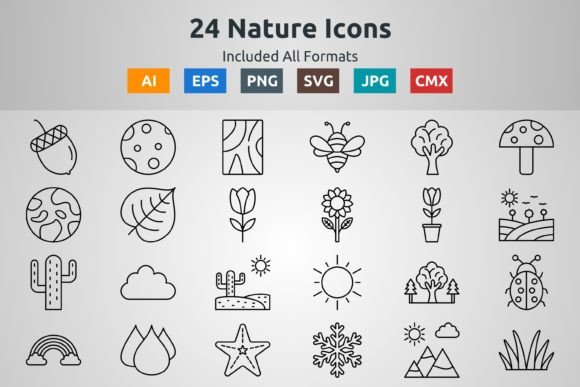
When you unzip the file, the first thing you notice is the consistency. The collection includes 24 distinct nature-themed elements, all sharing a unified visual language. They are outlines, which means they rely heavily on the quality of the running stitch or a very light satin stitch border to define their shape. There is no heavy fill work here, which is a double-edged sword. On one hand, this makes them incredibly versatile for custom apparel where you don't want a stiff patch of thread ruining the drape of a garment. On the other hand, outline designs demand precision. There is nowhere to hide if the digitizing is off.
The mood created by these Icons is modern, minimalist, and organic. They feel right at home in a boutique setting or on a handmade product intended for someone who appreciates subtle branding over loud logos. Whether it is a fern, a mountain range, or a simple leaf, the shapes are distinct enough to be recognizable even at smaller sizes, provided the stitch count supports that level of detail.
Real-World Application: The Tote Bag Test
To truly understand the value of this pack, I imagined a specific scenario: a local coffee shop owner needs a run of branded tote bag design options for their loyalty program. They want something earthy but not cliché. This is where the 24 Nature Outline Icons shine. Because the files come in AI, EPS, CMX, SVG, and JPG formats, the workflow is seamless. I can take the SVG or AI file, import it into my embroidery software, and quickly assign stitch types.
For a canvas tote, I would likely convert these outlines into a slightly thicker running stitch or a narrow satin stitch to ensure durability. Canvas has a rougher fabric texture than a t-shirt, so the thread needs to sit on top clearly without getting lost in the weave. The simplicity of these nature icons means they won't overwhelm the bag. A single icon placed on the corner creates a sophisticated look that elevates the perceived value of the finished product. Customers are more likely to carry a bag that looks like a piece of art rather than a walking billboard.
Apparel and Baby Items: Softness is Key
Moving beyond bags, these designs are exceptional for baby embroidery. When working on onesies or soft cotton sleepers, heavy fill stitch areas can be irritating against sensitive skin. The outline nature of these Graphics allows for a decorative element that remains soft and flexible. Imagine a set of burp cloths featuring different leaves from the collection, each stitched in a muted pastel thread colors palette. It creates a cohesive nursery theme without the bulk.
Similarly, for sweatshirt embroidery, these icons work beautifully on the chest or sleeve. A small mountain icon on a crewneck sweatshirt appeals to the outdoor enthusiast demographic. The key here is scaling. Since these are outlines, shrinking them too much on a thick fleece fabric might result in the stitches merging together, losing the definition of the icon. It is crucial to test the size on a scrap piece of the actual garment fabric before committing to the final run.
Technical Considerations and Potential Pitfalls
While the aesthetic appeal is high, there are technical hurdles to consider when using outline-heavy design assets. The primary concern is stitch density. If you simply auto-digitize these vectors without adjusting the pull compensation or stitch length, you might end up with gaps on curved sections or thread breaks on sharp corners.
For those planning to use these on dark fabric, remember that an outline design offers less coverage. If the fabric shows through the center of the icon, it might look unintentional unless that is the specific style you are aiming for. In such cases, you might need to add a light underlay or choose a thread color with high contrast. Conversely, on stretchy fabric like jersey knits, the lack of dense filling is a benefit, but you must use a high-quality cut-away stabilizer to prevent the design from distorting after washing.
Another critical area is the hoop size. While many of these icons are small enough for a 4x4 hoop, some of the more detailed compositions might require a 5x7 area to maintain clarity, especially if you decide to add text or combine multiple icons into a larger scene. Always check the dimensions in your embroidery software before hooping.
Commercial Viability for Etsy Sellers
For the Etsy seller or craft business owner, time is money. The fact that the 24 Nature Outline Icons are available in vector formats like AI and EPS means you can easily recolor them in Illustrator before digitizing, allowing you to offer custom colorways to clients without starting from scratch. This flexibility is a huge plus for creating printable mockup previews for your online shop. You can show a client exactly how a sage green leaf will look on a navy apron before you ever thread the machine.
However, a word of caution regarding licensing: always verify the terms included in the download zip. Just because you can buy the file doesn't automatically mean you can resell the digital file itself. Typically, these licenses allow for unlimited physical commercial embroidery projects, but restrictions often apply to redistributing the source files. Clarify this to protect your small shop product line and maintain professional integrity.
Final Verdict: A Solid Foundation for Creativity
The 24 Nature Outline Icons pack is a practical, high-quality resource for designers who understand the nuances of turning pixels into stitches. They are not a magic bullet; they require a skilled hand to digitize correctly for specific fabrics and applications. But when handled with care, they offer a clean, modern aesthetic that fits perfectly into today's market trends favoring minimalism and nature-inspired themes.
Whether you are making a personalized gift for a friend, producing a run of embroidered patches for a hiking club, or building a catalog of holiday embroidery designs for your winter collection, these icons provide a strong foundation. They remind us that sometimes, less really is more. By focusing on the purity of the line and the quality of the stitch, we can create finished products that feel thoughtful, professional, and enduring.
Before you start stitching, remember to test on scrap fabric, check your tension, and ensure your stabilizer choice matches the weight of your material. With these precautions, the 24 Nature Outline Icons can become a staple in your design library, helping you deliver work that customers trust and love to wear.